


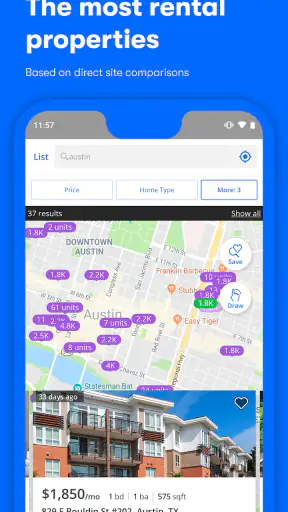
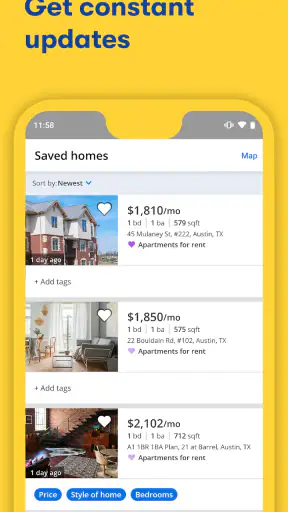
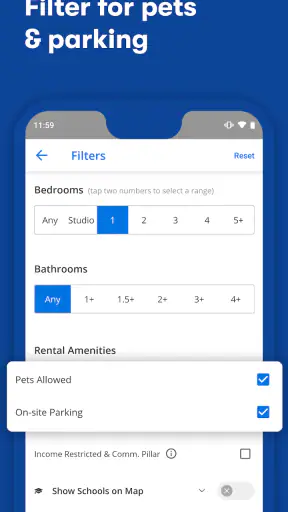
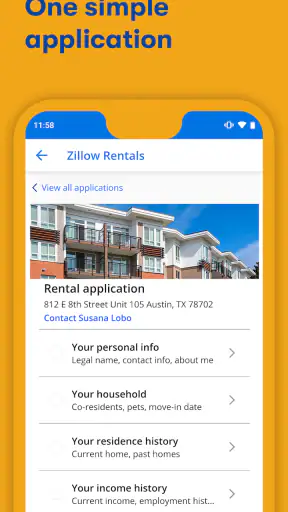
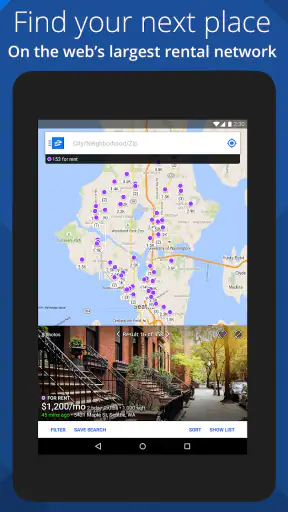
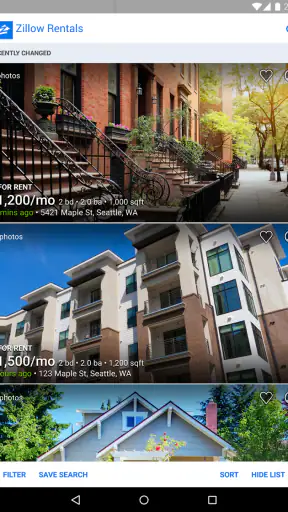
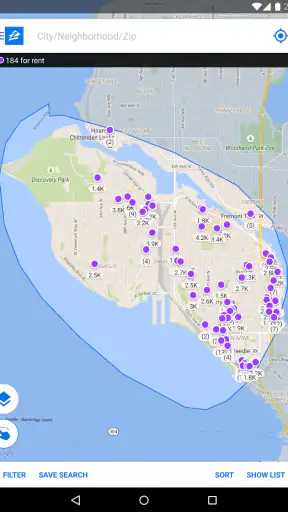
Finding a place to rent can quickly become a second job. You open several tabs, compare neighborhoods, forget which listing had parking, and then discover that one of your favorites is no longer available. I found Apartments & Rentals - Zillow most useful as a practical starting point for bringing that search into one familiar mobile workflow. It is a free House & Home app from Zillow Group, focused on browsing houses and apartments for rent with listings updated daily.
My first impression was that it is aimed at reducing the distance between “I might move” and “I know which homes are worth investigating.” It does not replace a viewing, a conversation with a landlord, or careful lease reading, but it can make the early research much less scattered. The experience is especially comfortable for someone who wants to browse from a phone, save promising options mentally or through the app’s available organization tools, and return to the search without starting from scratch.
What to expect when you open the rental search
The app is not a moving consultant and it is not a substitute for local knowledge. Its strength is helping me see the rental market through a searchable stream of homes and apartments rather than relying only on signs, word of mouth, or a general web search. That distinction matters: the app can help me discover possibilities, while I still need to judge whether a property is genuinely suitable and whether the listing deserves a direct follow-up.
The scale of the service gives it a reassuring first impression. Zillow has an average rating of 4.8 from around 74 thousand ratings, and the app has passed 5 million installs. Those figures do not guarantee that every listing will fit my needs, but they do suggest that this is an established tool rather than a small experiment. The age rating is Everyone, which also makes it approachable for households where different family members may help with the search.
I would describe the app as best for three kinds of renters. First, it suits people who are still learning what their budget can realistically find. Second, it works well for someone relocating and needing a broad view of an unfamiliar area. Third, it helps a busy renter monitor possibilities during spare moments instead of reserving a long desktop session for every search.
It is less suitable if I already have a very narrow requirement that depends on details not immediately obvious from a listing, such as a particular building rule, a precise commute at a specific hour, or a highly specialized accessibility need. In those cases, a local agent, property manager, or direct building contact may answer the important questions faster. I would also avoid treating a listing preview as proof that a home is still available or exactly as described.
The most useful mindset for a first-time renter
I got better results when I treated each search as a process of elimination rather than a hunt for one perfect photograph. A bright image can attract attention, but location, total monthly cost, move-in timing, and practical restrictions usually decide whether a home belongs on my shortlist. The app is valuable because it lets me gather candidates quickly; the quality of the final decision still comes from the questions I ask afterward.
One useful habit is to begin with a realistic area and then broaden it deliberately. If I search too widely, attractive options can create noise and make comparison difficult. If I search too narrowly, I may assume that suitable homes do not exist simply because my first boundary was too tight. I prefer to start with the neighborhood I want, inspect the results, and then make one controlled adjustment at a time.
That approach also makes the daily updates more useful. Instead of endlessly scrolling, I can notice what changes when I alter one preference. Do I see more suitable homes by moving slightly farther from the center? Does relaxing one nonessential feature reveal better value? This turns browsing into a small research exercise rather than passive swiping.
Setting up a search without making it complicated
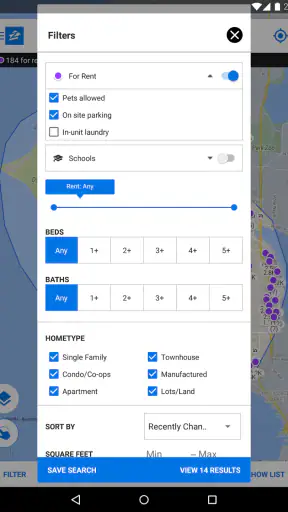
After installing the app, I would begin with the broadest decision: am I looking for an apartment, a house, or either? Then I would enter the area that matters most and narrow the results using only requirements that are genuinely important. A common mistake is to select every preference immediately. That can make the result list feel empty, even though the market may contain good options that miss one minor detail.
For a first pass, I recommend separating requirements into three groups in your own notes: must-have, strongly preferred, and pleasant surprise. A safe-feeling location or an affordable total cost may be a must-have. A balcony or a particular layout might be strongly preferred. Updated finishes may be nice but negotiable. This simple sorting system helps me use the app’s filters with more judgment.
The current version is 2026.63.0.129963 and it requires iOS or Android version 10 or later. For most current phones, that should make the technical starting point straightforward. Once it is installed, I would allow myself a few minutes to understand the search screen before trying to contact anyone. The goal is not to master every control; it is to create a result set that reflects how I would actually live.
I also suggest deciding how you will record your reasoning. If the app lets you save or revisit listings in your workflow, use that space for a shortlist, not a collection of every attractive home. If you prefer phone notes, write one sentence beside each candidate explaining why it survived. “Near work but small,” or “good layout, need to confirm utilities” is more useful later than a vague feeling that the place looked nice.
Reaching the first meaningful result
For me, a successful first session is not simply opening a listing. It is finding one property that appears worth a real follow-up and understanding why. Start by searching the desired location, scan the initial results, open a few plausible homes, and compare them using the same questions. Is the location workable? Does the home appear to match the basic space requirement? Is the advertised cost within the amount you planned to spend before additional expenses?
Once one listing survives that check, read it slowly instead of relying on the first image. Look for details that affect daily life: how the rooms connect, whether the surroundings seem practical, and whether the description leaves questions you need answered. I would then save the listing through my chosen workflow or note its identifying details, so I can find it again without trusting my memory.
A concrete example is a first-time renter moving for a new job. On a lunch break, I might search near the workplace, open several apartments, and remove anything that looks too far away or unsuitable for the intended routine. I could then keep two or three candidates, compare their locations and visible features, and prepare a short message asking about availability, total costs, viewing times, and any important restrictions. That is a meaningful success because the app has turned uncertainty into a manageable next action.
Another useful tactic is to compare a home with nearby alternatives before becoming emotionally attached to it. If one apartment looks unusually appealing, I would check other results in the same area and price range. This gives me a sense of whether the listing is a rare opportunity or simply the first attractive option I noticed. It also gives me better questions for a viewing: why does one home cost more, and what exactly am I receiving for that difference?
Where new users can become confused
The biggest source of confusion in any rental app is the difference between what is visible and what is confirmed. A listing may look complete while still leaving important practical questions unanswered. I never assume that a photograph proves current condition, that a displayed price covers every recurring expense, or that a home is still available simply because it appears in the results.
Daily updates are helpful, but they should encourage regular checking rather than create false urgency. If a property matters to me, I would review its details again before making plans, then contact the relevant party directly. I would also keep a written record of what was said, especially about move-in timing, deposits, included services, pets, parking, and maintenance responsibilities.
Another point of friction is search precision. Filters are useful, but every filter represents a trade-off. A strict bedroom requirement may exclude a home with a flexible layout. A narrow location may hide an adjacent neighborhood with better transport. A preference for a certain feature may reduce the options before I have learned whether that feature is truly essential. I get more from the app when I change one filter at a time and observe the result.
Photos can create a second kind of confusion. A room can appear spacious because of a wide camera angle, while a different listing may look plain but have a more practical layout. I try to inspect the relationship between rooms, windows, storage, and entrances rather than judging decoration. If the listing does not answer a question that would affect my decision, I mark that question for the property contact instead of guessing.
There is also a difference between discovering a home and completing a rental. The app helps with discovery and comparison, but I still need to verify identity, inspect the property safely, understand the lease, and use sensible caution with money and personal information. I would not send funds merely because a listing looks convincing in an app. A viewing and clear documentation remain important parts of the process.
Turning a shortlist into a sensible decision
Once I have a few candidates, I stop browsing broadly and switch to comparison mode. I write down the same categories for each home: location, visible condition, likely daily convenience, questions requiring confirmation, and reasons to reject it. This prevents the most photogenic listing from winning automatically and makes the next conversation more efficient.
One non-obvious advantage of this method is that it exposes hidden costs in my own priorities. A cheaper apartment farther away may not be cheaper after transport, time, or required furnishings are considered. A larger home may be poor value if its layout creates unused space. The app cannot make that personal calculation for me, but it gives me enough candidates to notice the trade-offs.
I also find it useful to search at different times rather than assuming the first session represents the whole market. Since rental listings can change, returning later may reveal a different set of possibilities. I would not interpret every new result as a reason to restart the entire search; instead, I would compare it with the standards established by my shortlist.
For families or housemates, the app can support a more organized conversation if one person does the initial filtering and everyone reviews the same small group. Sending a long stream of unrelated listings usually produces disagreement. Sharing a shortlist with a note about the strongest reason for each candidate makes it easier to discuss location, space, and compromises without losing track.
When another approach may work better
I would choose a direct property-management site when I already know the building or community I want and need the most current information from that source. I might prefer a local agent when the search involves unusual requirements, a difficult relocation, or a neighborhood where personal context matters more than a broad list of results. I would use a general search engine for background research, but I would not expect it to organize rental discovery as effectively.
Compared with walking or driving around a neighborhood, Zillow’s rental app is faster for forming an initial picture and easier when I am searching from another city. The trade-off is that a map and listing page cannot reproduce the feel of a street, the noise at a particular hour, or the condition of nearby public spaces. I would use the app to decide where to investigate, then visit the area when the decision becomes serious.
Compared with keeping a spreadsheet of links, the app is more convenient for discovery because the search happens in one place. A spreadsheet can still be better for final comparison, especially when several people need to add notes or calculate a full monthly budget. My preferred workflow is to use the app for finding and narrowing, then move only the serious candidates into a simple comparison note.
A practical second session
After the first successful search, I would return with a clearer purpose instead of repeating the same scroll. Maybe I need to focus on homes with a shorter commute, or perhaps I learned that my original area was too expensive. I would adjust the search based on evidence from the first session, not on a random impulse.
This is where the app becomes more than a one-time browsing tool. I can refine my understanding of what matters, compare newly noticed homes against the earlier shortlist, and prepare more precise questions. The best result is not necessarily finding a listing immediately; it may be learning that I need a different neighborhood, a different home type, or a more flexible requirement.
For a renter who is ready to act, I would keep the next step concrete: choose a small number of plausible listings, verify the important details, and request a viewing or further information through the appropriate contact route. For someone only exploring, I would use the app to learn the relationship between location, space, and budget without making promises too early.
My recommendation after using it
Apartments & Rentals - Zillow is a strong first stop for anyone who wants a clearer, more focused way to explore rental homes on a phone. Its free price removes an obvious barrier, and its Everyone rating makes it easy to recommend as a shared household research tool. Zillow Group’s long-running presence in this space also gives the app a level of familiarity that many first-time renters will appreciate.
My recommendation comes with one important condition: use it as a discovery and comparison assistant, not as the final authority on a property. The most successful users will question listings, check practical details, and keep their own shortlist rather than assuming that the first appealing result is the right one. That habit matters more than endless scrolling.
I would recommend it to a first-time renter, a person relocating, or anyone who wants to understand what is available before contacting landlords or property managers. I would be more cautious about recommending it as the only tool for a highly specialized search or a decision that depends on details the listing cannot show. In those situations, direct local help should join the process.
Overall, the app earns its place on my phone because it makes the early rental journey less chaotic. The path is simple: set a realistic area, apply only meaningful filters, inspect a small number of listings, record the reasons they matter, and verify everything important before moving forward. Used that way, it can take a nervous first-time search and turn it into a series of calm, practical decisions.


